How to fill in the Korea e-Arrival Card
The Korea e-Arrival Card is two pages on Korea’s official portal: an agreement page, then one declaration form that takes up to 9 people. It is free. File it from 3 days before you arrive, Korea time, then click Submit and enter the verification code yourself. Below is every box, in the form’s order.
- Cost:Free
- Official site:www.e-arrivalcard.go.kr
- Last checked:19 Sep 2026
What do you need before you start?
- The passport of everyone on the form
- Your arrival and departure dates, and your flight number or ship name
- The address where you’ll stay in Korea: its street name and building number, or its 5-digit postcode
- An email address, and a phone number for the Contact Information box
- A Korean visa number, if you have one
What do you do on the first page?
The portal allows a third party to file for a traveler who cannot do it themselves, and it says the same consequences apply when false information is filed on someone’s behalf.
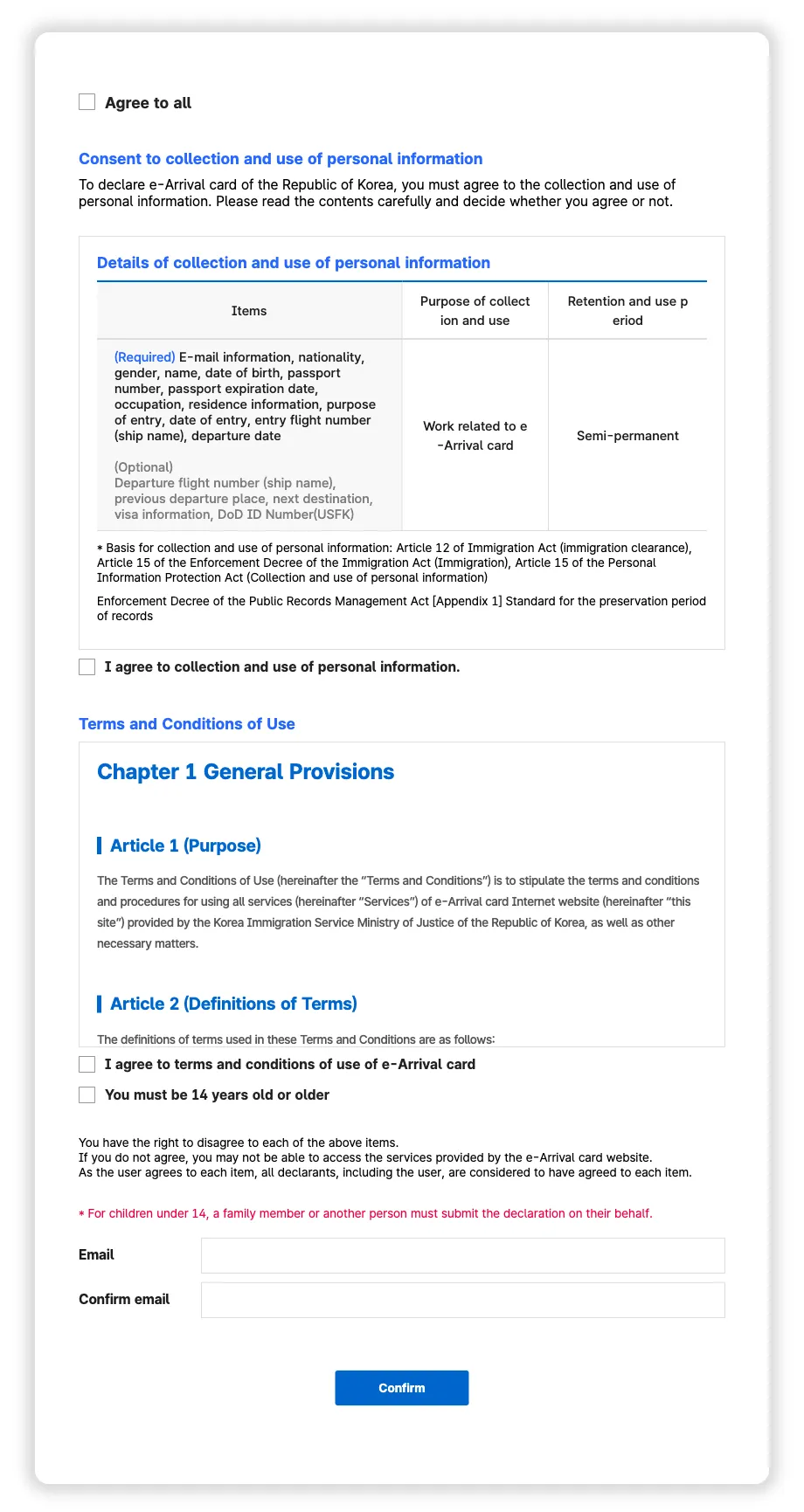
Agree to all
Optional
Checking it checks the three boxes below at once. The portal only looks at those three, so checking them one by one works too.
I agree to collection and use of personal information.
Required
Check it to consent to the collection and use of the personal information the form asks for.
I agree to terms and conditions of use of e-Arrival card
Required
Check it to agree to the portal’s terms and conditions of use.
You must be 14 years old or older
Required
Check it to confirm the representative is old enough. The representative is the person filing, whose email goes below. The portal words the age two ways: this box says 14 or older, while its how-to page says “a person aged 14 or younger cannot be a representative declarant”. Under the boxes it adds that children under 14 have a family member or another person file for them.
Email
Required · up to 100 characters
The representative’s email address. Every issue number on the form is sent here, so use an address you can open while traveling. The portal warns that Gmail, Outlook.com, Hotmail.com, and QQ.com mail can arrive late or not at all.
Confirm email
Required · up to 100 characters
The same address again. Paste is blocked in this box, so type it. Then click Confirm to open the form.
What goes in each box of the declaration form?
Box names as the official form showed them when we last recorded it, on 2 Sep 2026.
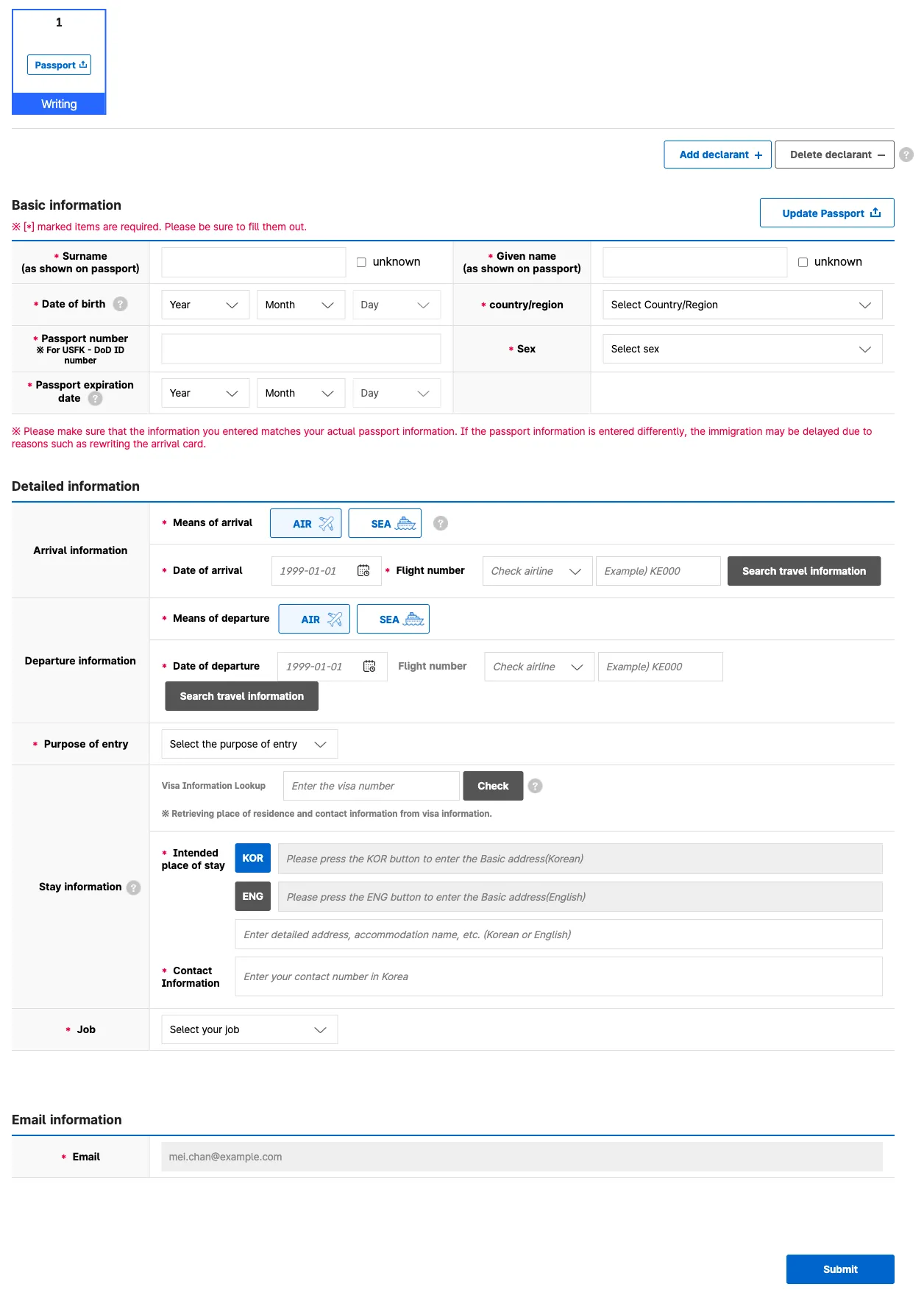
Surname (as shown on passport)
Sometimes required · up to 100 characters
When the form opens, a window asks you to upload a photo of your passport’s photo page; close it with X to type everything yourself. Then enter your surname as shown in your passport. The box keeps English letters and spaces only and turns them into capitals, so hyphens and apostrophes disappear. Check “unknown” beside it only if your passport shows no surname: the box locks and the portal records UNKNOWN. You can’t check “unknown” for both names.
Given name (as shown on passport)
Sometimes required · up to 100 characters
Your given names as shown in your passport, all in this box. Same rule: English letters and spaces only, in capitals. Check “unknown” beside it only if your passport shows no given name; the box then locks and the portal records UNKNOWN.
Date of birth
Required
Three lists: pick the year, then the month, then the day. The Day list stays empty until you have picked a month. If your passport shows XX for the day and month, the portal’s FAQ says to enter it as 00: its example XX/XX/1999 becomes 1999.00.00. Pick 00 as the month, and the Day list then offers only 00.
country/region
Required · 213 options, such as “AFGHANISTAN”
Your nationality as shown in your passport. Click the box and pick your country from the list, where names are written out in capitals. If you use the list’s Search box, typing UNITED shows UNITED NATIONS and UN SPECIALIZED AGENCY before UNITED STATES OF AMERICA, so check the line you click. Picking VANUATU opens an extra box of questions; when we recorded the form, it had none to answer, and other nationalities never see it.
Passport number ※ For USFK - DoD ID number
Required · up to 10 characters
Your passport number: up to 10 letters and digits, with anything else removed. Members of US Forces Korea fill in the details of the document they will show at immigration, the portal’s FAQ says. That is a passport, or their US military ID, whose DoD ID number goes here.
Sex
Required · options: Female · Male · Third gender
As shown in your passport.
Passport expiration date
Required
Your passport’s expiry date, picked year, month, then day, like the date of birth; there is no 00 here. The portal clears all three lists if the date is earlier than today or than your arrival date.
Means of arrival
Required · options: AIR · SEA
AIR is already selected when the form opens. Click SEA if you arrive by ship: the next box changes from Flight number to Ship name.
Date of arrival
Required · up to 10 characters
Your arrival date. The calendar only offers today and the next two days, Korea time, which is the 3-day window. If your date isn’t there yet, it’s too early to file.
Flight number
Sometimes required · up to 6 characters
The airline code and flight number from your ticket, up to 6 characters. There must be at least three digits after the code, so KE081 and not KE81. The portal rejects KE81 when you submit. The airline list beside it (“Check airline”) fills itself from the first two letters, so you don’t need to open it. The Search travel information button can look up where your flight comes from; the form doesn’t require it.
Ship name
Sometimes required · up to 20 characters
Only if you chose SEA: the name of the ship, up to 20 characters. The portal turns it into capitals.
Means of departure
Optional · options: AIR · SEA
AIR is already selected. Click SEA if you leave Korea by ship.
Date of departure
Required · up to 10 characters
The day you plan to leave Korea; it can’t be before today. No return ticket yet? The portal’s FAQ says you can enter an approximate date.
Flight number
Optional · up to 6 characters
Optional: the flight you leave Korea on, if you know it. Its Search travel information button can look up your next destination; the form doesn’t require it.
Ship name
Optional · up to 20 characters
Optional: the name of the ship, if you leave by SEA.
Purpose of entry
Required · options: Tourism (individual) · Tourism (group) · Business · Diplomacy/
official duties · Treatment/ Medical care · Visit (Family/ relatives/ friends, etc.) · Meeting/ event · Employment · Studies · Sports game · Others Why you’re visiting. Pick Others to describe it yourself in the box that appears, using English or Korean letters, numbers, and spaces; other symbols are removed.
Visa Information Lookup
Optional · up to 20 characters
Only if you hold a Korean visa: type its number in the box. The Check button beside it fills your place of stay and contact number from the visa. If it finds no visa it clears those boxes, so click it before you fill them in, or not at all.
Intended place of stay
Required
Your place of stay comes from the portal’s address search, not from typing. Click KOR or ENG, then search by the road-name address or by the 5-digit postcode, and click your address in the results. The road-name address is the street name, keeping its hyphen (such as -ro, -gil, or -daero), and the building number. A postcode alone can return several pages of addresses, so the street address is quicker. The Korean and English address boxes then fill themselves and stay locked. Hotel names aren’t searchable: put the room number and the hotel or building name in the optional box below them, “Enter detailed address, accommodation name, etc. (Korean or English)”, up to 200 characters. It keeps letters, numbers, spaces, and # , . - only, and turns letters into capitals. Clearing immigration on a same-day transit? The portal’s FAQ says to use the airport’s address, such as 272 Gonghang-ro for Incheon Airport T1.
Contact Information
Required
The box says “Enter your contact number in Korea”, and it keeps digits only: dashes, spaces, and a leading + are removed. The portal doesn’t say what to enter if you have no Korean number; you can ask it at earrivalcard@korea.kr or on 1345 (+82-2-1345 from abroad).
Job
Required · options: Office worker · Self-employed · Student · Unemployed · Household activities · Public official · Agriculture and livestock industry · Others
Pick the closest of the eight. The portal gives no rule for children or retirees; Others opens a box where you describe it yourself, using English or Korean letters, numbers, and spaces.
Email
Required
Already filled in with the representative’s email from the first page. You can’t change it here.
Declarant’s email
Optional
Optional: this traveler’s own email. The issue number goes to both the representative and this address.
Filing for more than one traveler?
The Individual form takes up to 9 people, on a computer or phone. Click Add declarant for each extra person, then click that person’s tab to fill in their card. The passport-photo window opens again each time, so close it. From the second card on, the portal fills in the arrival details from the first card: “* Same arrival information as the representative will be entered.” Those cards also have a “Same as the representative applicant” box: checking it copies the first card’s departure date and flight number or ship name, purpose of entry, place of stay, and contact number. Passport details and the job are still entered for each person. For 2 to 1,000 people with the same arrival date and flight, the Group/Travel Agency form works on a computer only.
How do you submit it?
- Check every card against the passports. A box the portal still needs gets a red outline, and its card says “Not complete”.
- Click Submit. The portal asks: “Please check that all the information you entered is correct. If it is entered correctly, click ‘OK’.”
- Click OK, then type the six-digit verification code shown in the image. An audio version is available.
- Save or print the PDF with each person’s issue number; the issue numbers are also emailed to the representative. There is no QR code, and you don’t have to show any of it at the counter.
- To check or correct it later, use Check/Edit with an issue number or email verification. The arrival date can only be changed within 3 days of your first submission.
What’s next?
One agreement page, then one form for up to 9 people: the address comes from the portal’s own search, and the verification code comes last. Check each card against the passports, then click Submit and enter the code yourself.
- Open the official Korea e-Arrival Card form on www.e-arrivalcard.go.kr. It is free to fill in and submit there.
- Read the Korea e-Arrival Card guide for who is exempt, when to file, and fixing a mistake.
- Fill it in with visayes. You review every box and submit it yourself. Your first one-traveler form per country is free. visayes Premium fills in your whole group in one go.