How to fill in the Malaysia Digital Arrival Card (MDAC)
The MDAC is one page on Malaysia’s official immigration portal: 22 boxes, 21 of them required, and it is free. Fill it in within 3 days before you arrive, one form per traveler, then drag the slider and click Submit yourself. Below is every box, in the order the form shows it.
- Cost:Free
- Official site:imigresen-online.imi.gov.my
- Last checked:19 Sep 2026
What do you need before you start?
- Your passport
- Your arrival and departure dates, and your flight, vessel, or other transport number
- The address where you’ll stay in Malaysia, with its postcode
- An email address and a mobile number
What goes in each box?
The portal is at imigresen-online.imi.gov.my/mdac/main; choose Registration to start. The same portal also lets you check a registration, check a visit pass, and check e-gate eligibility.
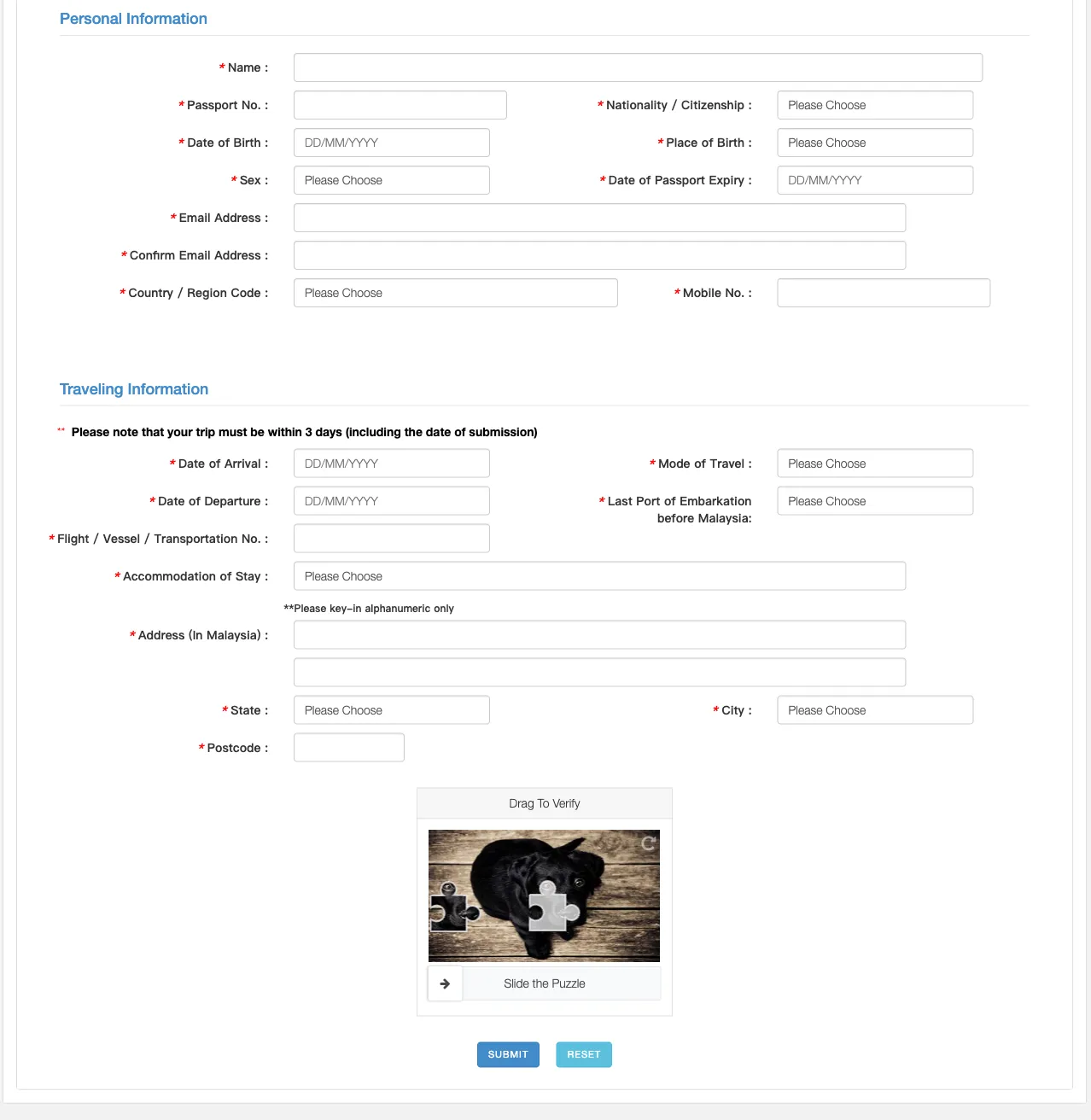
Name
Required · up to 60 characters
Your full name exactly as it appears in your passport, all in this one box. It takes letters and spaces only, so hyphens, apostrophes, and periods can’t be typed. Paste is blocked too, so type it.
Passport No.
Required · up to 12 characters
The number of the passport you’ll travel on. Paste is blocked, so type it and check it twice.
Date of Birth
Required
You can’t type in this box. Click it, then click the title at the top of the calendar twice to jump to a list of years; pick your birth year, then the month and the day. Click the arrows slowly because quick repeated clicks get lost.
Nationality / Citizenship
Required · 273 options, such as “AFG - AFGHANISTAN”
Your citizenship, as shown in your passport.
Place of Birth
Required · 273 options, such as “AFG - AFGHANISTAN”
The country you were born in, picked from the same country list, not your city.
Sex
Required · options: MALE · FEMALE
As shown in your passport.
Date of Passport Expiry
Required
Another calendar-only box: pick the expiry date printed in your passport. The calendar won’t offer dates before today, so an expired passport can’t be entered.
Email Address
Required · up to 100 characters
An email address you can open while traveling. Paste is blocked, so type it.
Confirm Email Address
Required · up to 100 characters
The same address again. Paste is blocked here too, so you type it twice.
Country / Region Code
Required · 242 options, such as “( 1 ) CANADA”
The dialing code for your mobile number. Pick it by country name: Canada and the United States both show ( 1 ).
Mobile No.
Required · up to 12 characters
Your mobile number without the country code, digits only, no spaces or dashes. Paste is blocked.
Date of Arrival
Required
Calendar only, and it only offers today, tomorrow, and the day after: the 3-day window counts the day you submit. If your arrival date isn’t there yet, it’s too early to register.
Date of Departure
Required
Pick the day you leave Malaysia. It can be the same day as your arrival. Changing the arrival date later empties this box, so check it again before you submit.
Flight / Vessel / Transportation No.
Required · up to 30 characters
The full number on your ticket. For a flight that is the airline code plus the digits, such as AK105. Paste is blocked.
Mode of Travel
Required · options: AIR · LAND · SEA
How you arrive: by air, over land, or by sea. The MDAC applies to all three, so land and ferry crossings need one too.
Last Port of Embarkation before Malaysia
Required · 274 options, such as “AFG - AFGHANISTAN”
Despite the name, this is a country list. Pick the country of the last place you board before Malaysia. If you change planes on the way, that’s the country of your connection. Crossing by land or ferry, pick the country you cross from.
Accommodation of Stay
Required · options: HOTEL/
MOTEL/ REST HOUSE · RESIDENCE OF FRIENDS/ RELATIVES · OTHERS Where you’ll stay. Whichever you pick, the form still asks for the full address below. Transiting airside in the same KLIA terminal? The Immigration Department’s FAQ says to choose OTHERS and give the address as “In Case of Emergency - Transit Only” followed by your flight number.
Address (In Malaysia)
Required · up to 100 characters
The street address of where you’ll stay. Letters, numbers, spaces, and these symbols only: , - / @ ' ( ). Anything else, such as # or a period, is dropped as you type. Paste is blocked.
Accommodation Address2
Optional · up to 100 characters
The rest of the address, with the same character rules as the first line. Paste is blocked here too.
State
Required · options: JOHOR · KEDAH · KELANTAN · MELAKA · NEGERI SEMBILAN · PAHANG · PULAU PINANG · PERAK · PERLIS · SELANGOR · TERENGGANU · SABAH · SARAWAK · WP KUALA LUMPUR · WP LABUAN · WP PUTRAJAYA
Pick the state before the city: the City list only loads after you choose one, which takes a second or two.
Postcode
Required · up to 5 characters
Five digits. Choosing a city doesn’t fill it in for you, so enter it yourself.
City
Required · the list depends on State
Choose it after State. If the list is still empty, wait a moment for it to load.
Filing for more than one traveler?
The official website takes one person per form, with no button to add another traveler. The Immigration Department’s FAQ allows filling it in for someone else, so submit one form, open a new form from the portal for the next person, and fill in every box again.
How do you submit it?
- Check every box against your passport. The form has no save button, and refreshing the page clears it.
- Complete “Drag To Verify”: slide the puzzle piece into place.
- Click Submit. Don’t click Reset because it clears the whole form.
- Save or screenshot whatever the site shows after you submit. At the immigration counter you show your MDAC registration and your passport.
- To check it later, use Check Registration on the portal; it asks for your passport number, nationality, and a PIN. Spotted a mistake? Submit a new MDAC with the correct details. That is what the Immigration Department’s FAQ says to do.
What’s next?
One page, 22 boxes: dates come from a calendar, eight of the typed boxes block paste, and each traveler needs their own form for every entry. Check it against your passport, drag the slider, and click Submit yourself.
- Open the official MDAC form on imigresen-online.imi.gov.my. It is free to fill in and submit there.
- Read the Malaysia Digital Arrival Card guide for who is exempt, when to file, and fixing a mistake.
- Fill it in with visayes. You review every box and submit it yourself. Your first one-traveler form per country is free. visayes Premium fills in your whole group in one go.