How to fill in the Thailand Digital Arrival Card (TDAC)
The TDAC is a free form on Thailand’s official immigration portal: 54 boxes over three steps and a Preview page, 19 of them always required. File it from 3 days before you arrive, up to 10 travelers per submission, then check the consent box and click Submit yourself. Below is every box, in order.
- Cost:Free
- Official site:tdac.immigration.go.th
- Last checked:19 Sep 2026
What do you need before you start?
- Your passport
- Your arrival date, and your flight or vehicle number
- The address where you’ll stay in Thailand
- Your reason for traveling
- The countries you stayed in during the two weeks before you arrive
- An email address to receive the card
What goes in the Personal Information step?
The portal is at tdac.immigration.go.th; click “Arrival Card” to start. The Immigration Bureau puts it at about 3–5 minutes per person with your details ready.
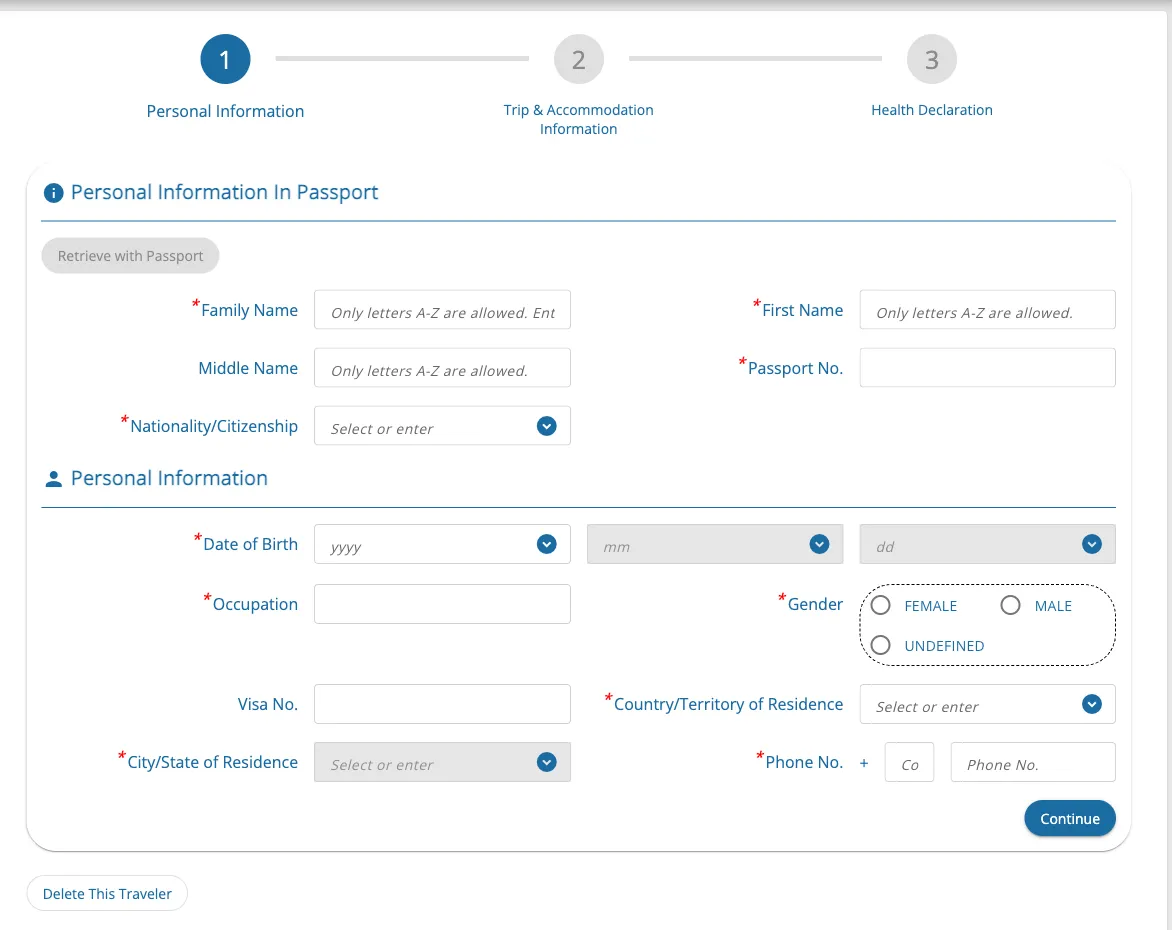
Family Name
Required · up to 60 characters
Your surname exactly as in your passport, in English letters. The box takes letters A–Z and spaces only. Hyphens, apostrophes, and numbers are dropped as you type, with no warning. If you have no family name, follow the box’s own hint: “Only letters A-Z are allowed. Enter ‘–’ if none.”
First Name
Required · up to 60 characters
Your given names exactly as in your passport. The box’s hint reads “Only letters A-Z are allowed.” Like the surname box, it silently drops anything else.
Middle Name
Optional · up to 60 characters
Optional. Your middle name as in your passport, if it has one. Same rule: letters and spaces only.
Passport No.
Required · up to 20 characters
The number of the passport you’ll travel on, exactly as printed.
Nationality/Citizenship
Required · 259 options, such as “ABW : ARUBA”
Your nationality as shown in your passport. Type the first three letters, then click your country in the list that appears.
Date of Birth - yyyy
Required
Your date of birth takes three boxes, filled in order: year, then month, then day. The month box opens once the year is set.
Date of Birth - mm
Required
The month, as two digits (the box shows mm). It opens after the year.
Date of Birth - dd
Required
The day, as two digits (the box shows dd). It opens after the month.
Occupation
Required
A free-text box, not a list: type your occupation in English. If you don’t work, say so with STUDENT or RETIRED.
Gender
Required · options: FEMALE · MALE · UNDEFINED
As shown in your passport. UNDEFINED is the official form’s own wording for the third option.
Visa No.
Optional
Optional: the number of your Thai visa, if you have one. The portal’s version notes say it accepts dashes (-), slashes (/), and spaces.
Country/Territory of Residence
Required · 259 options, such as “ALA : ALAND ISLANDS”
The country you live in. Choose it before the phone code: picking it fills in Phone Country Code for you.
City/State of Residence
Required · the list depends on Country/
Territory of Residence Your city or state. It opens after you choose the country; click a suggestion or type your own.
Phone Country Code
Required
Filled in when you choose your country of residence. Check it matches the country of your phone number.
Phone No.
Required · up to 25 characters
Your phone number, without the country code.
What goes in the Trip & Accommodation Information step?
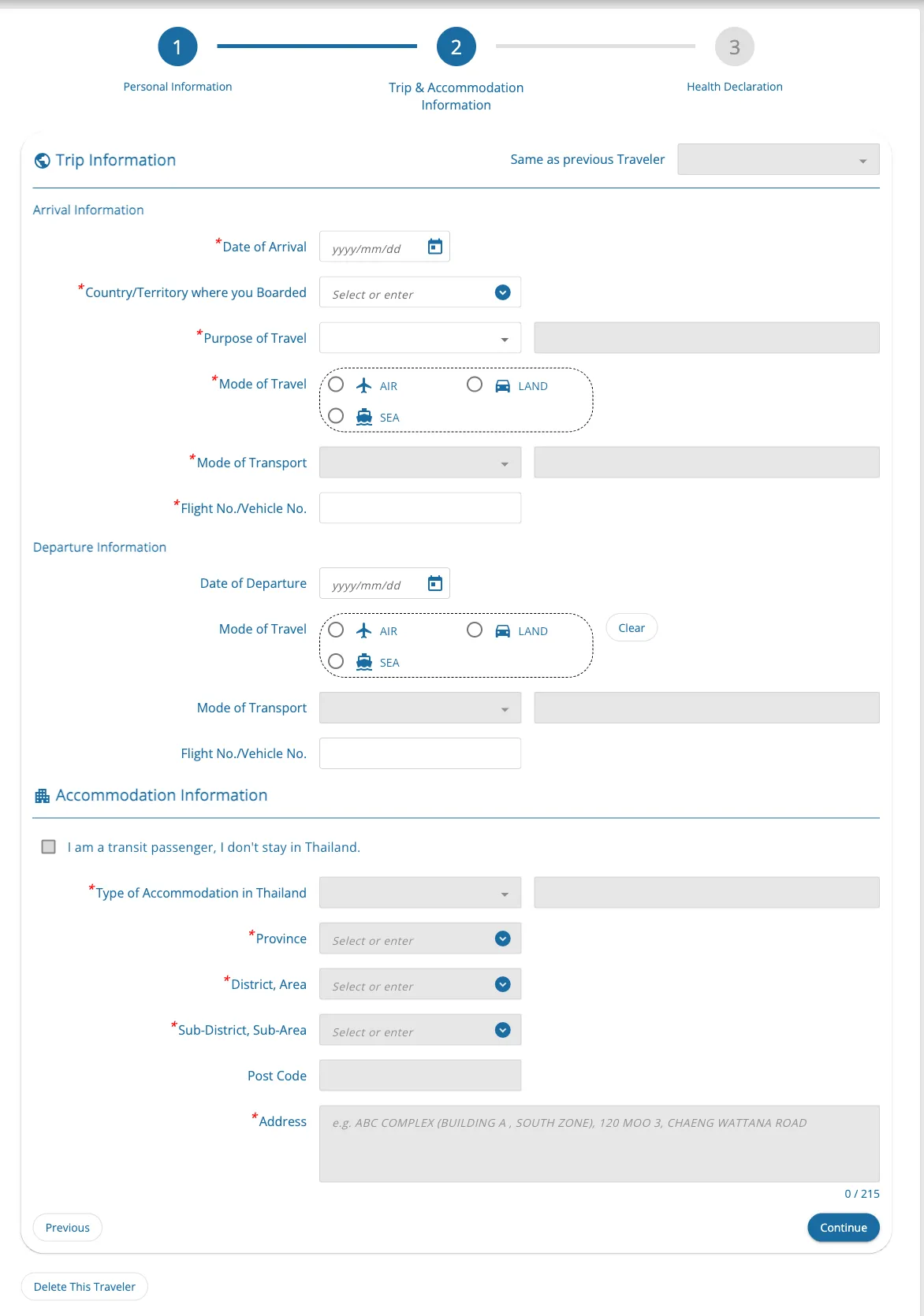
Date of Arrival
Required
Type the date as digits only, such as 20261005; the box adds the slashes itself (it shows yyyy/mm/dd). Your arrival must fall in the 3-day window: arriving on 5 May, you can file from 2 May.
Country/Territory where you Boarded
Required · 259 options, such as “ALA : ALAND ISLANDS”
For a direct trip, the country you set off from. Changing planes on the way? The official site gives no guidance on which country to enter. What it does say: the country you boarded from can trigger extra health questions if Thailand’s Ministry of Public Health lists it. Either way, the Health Declaration step asks for every country you stayed in during the two weeks before arrival.
Purpose of Travel
Required · options: HOLIDAY · MEETING · SPORTS · BUSINESS · INCENTIVE · MEDICAL & WELLNESS · EDUCATION · CONVENTION · EMPLOYMENT · EXHIBITION · OTHERS (PLEASE SPECIFY)
Why you’re visiting. OTHERS (PLEASE SPECIFY) opens a box to describe it.
Purpose of Travel - Other
Sometimes required
Appears only if you pick OTHERS (PLEASE SPECIFY): describe your purpose in English.
Mode of Travel
Required · options: AIR · LAND · SEA
How you arrive. Land and sea arrivals need a TDAC too.
Mode of Transport
Optional · the list depends on Mode of Travel
The list follows your Mode of Travel: COMMERCIAL FLIGHT or PRIVATE/CARGO AIRLINE by air, CAR or TRAIN by land, and CRUISE or COMMERCIAL VESSEL by sea. Each also offers OTHERS (PLEASE SPECIFY), which opens a box to describe it.
Mode of Transport - Other
Sometimes required
Appears only if you pick OTHERS (PLEASE SPECIFY): name your transport in English.
Flight No./Vehicle No.
Required
The number of your flight, or of your vehicle if you arrive by land, because the box’s name covers both. The portal’s version notes put the limit at 20 characters.
Date of Departure
Optional
Optional, as the whole departure block is. Leaving the same day you arrive greys out the accommodation boxes, and leaving the next day unlocks the transit box below. Changing the arrival date afterwards empties this box, so check it again.
Departure Mode of Travel
Sometimes required · options: AIR · LAND · SEA
Once you start the departure block, this becomes required. Started it by mistake? The portal’s “Clear” button empties it.
Departure Mode of Transport
Sometimes required · the list depends on Departure Mode of Travel
The same list as for arrival, following your departure Mode of Travel.
Departure Mode of Transport - Other
Sometimes required
Appears only if you pick OTHERS (PLEASE SPECIFY) for your departure: name the transport in English.
Departure Flight No./Vehicle No.
Sometimes required
Your departure flight or vehicle number, needed once you fill in the departure block.
I am a transit passenger, I don't stay in Thailand.
Optional
Check it only if the sentence describes you. The form lets you check it only when your departure date is the day after your arrival. Checking it greys out the accommodation boxes below: they stay on the page, still marked required, and you can no longer type in them.
Type of Accommodation in Thailand
Sometimes required · options: HOTEL · YOUTH HOSTEL · GUEST HOUSE · FRIEND'S HOUSE · APARTMENT · OTHERS (PLEASE SPECIFY)
Where you’ll stay. With HOTEL, District and Sub-District stay optional; with any other type they become required. OTHERS (PLEASE SPECIFY) opens a box to describe it.
Type of Accommodation - Other
Sometimes required
Appears only if you pick OTHERS (PLEASE SPECIFY): describe the place in English.
Province
Sometimes required · 77 options, such as “AMNAT CHAROEN”
The province of your address. Type the first three letters and click it in the list; the district list loads after.
District, Area
Sometimes required · the list depends on Province
Loads after the province. One trap: Phra Nakhon Si Ayutthaya has two districts both called BANG SAI. After picking one, check that Post Code shows the right number, 13190 or 13270.
Sub-District, Sub-Area
Sometimes required · the list depends on District, Area
Loads after the district. Type the name as the list spells it, so Bangkok’s Silom is SI LOM with a space. Then click it. A name the list doesn’t recognize is cleared.
Post Code
Optional
A default fills in once you choose the district. Check that it matches your address.
Address
Sometimes required · up to 215 characters
The street address where you’ll stay, in English.
What goes in the Health Declaration step?
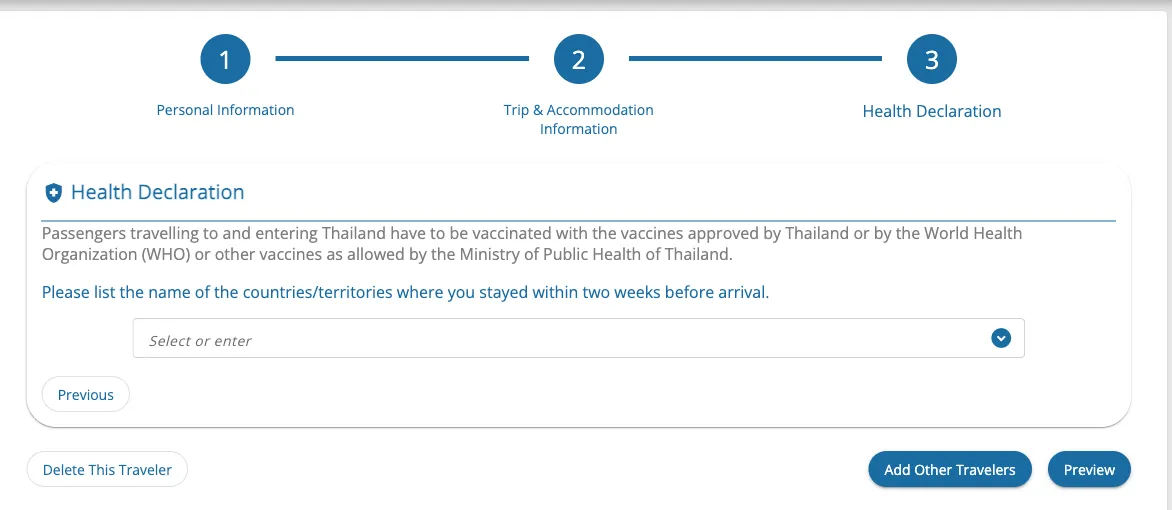
Please list the name of the countries/territories where you stayed within two weeks before arrival.
Optional · 259 options, such as “ALA : ALAND ISLANDS”
Every country you stayed in during the two weeks before arrival, picked one by one. If one of them, the country you boarded from, your nationality, or your flight is on the Ministry of Public Health’s list, the form adds the questions below.
Do you have Yellow Fever Vaccination Certificate?
Sometimes required · options: YES · NO
Appears only if the form adds the extra questions. Answer about your own certificate.
Date of Vaccination
Sometimes required
Appears if you answer YES: the vaccination date on your certificate.
Upload Certificate
Sometimes required
Appears if you answer YES: a copy of your certificate. The portal’s version notes say this upload was made optional; if the form still asks for it, attach it.
Diarrhea
Optional
The symptom boxes come with the extra questions. Check each one that applies to you; if none do, check No Symptom.
Vomiting
Optional
Check it if it applies to you.
Abdominal pain
Optional
Check it if it applies to you.
Fever
Optional
Check it if it applies to you.
Rash
Optional
Check it if it applies to you.
Headache
Optional
Check it if it applies to you.
Sore throat
Optional
Check it if it applies to you.
Jaundice
Optional
Check it if it applies to you.
Cough or shortness of breath
Optional
Check it if it applies to you.
Enlarge lymph glands or tender lumps
Optional
Check it if it applies to you.
Other (Please Specify)
Optional
Check it for a symptom that isn’t listed; a box opens to describe it.
Other symptoms
Sometimes required
Appears when you check Other (Please Specify): describe the symptom in English.
No Symptom
Optional
Check it if none of the symptoms apply to you.
What goes on the Preview page?
Please specify an email to send Thailand Digital Arrival Card
Required · up to 50 characters
On the Preview page: the one email address your card is sent to. Going back with “Edit” empties the box, so type it again.
Filing for more than one traveler?
One submission holds up to 10 travelers. After the first traveler’s health declaration, click “Add Other Travelers” and fill in the next person; from the second traveler on, “Same as Previous Traveler” lets you reuse the previous traveler’s trip and accommodation details. Click “Preview” when everyone is in. The Immigration Bureau’s FAQ says you may fill it in for family members, children, or group travelers.
How do you submit it?
- Click “Preview” and check every detail against your passport; to correct something, click “Edit”. The portal can’t save a half-finished card, so finish in one go.
- Check the box to agree to the Terms and Conditions, then click “Submit”.
- Download the card. A copy also goes to your email. At immigration, show it on your phone, or bring a printout if you won’t have a device.
- No email with your QR code? The Immigration Bureau’s FAQ says to contact the immigration officer at the entry checkpoint.
- Flight, dates, or address changed? Before you travel, use “Update Arrival Card” with your TH Digital Arrival Card No., date of birth, and nationality. Name, nationality, and date of birth can’t be updated there. For passport number, the Immigration Bureau’s FAQ says it can’t be either; its user guide leaves it off that list. If the portal won’t let you change a detail, submit a new card; the latest one counts.
What’s next?
54 boxes over three steps and a Preview page: country and address boxes are lists you type into and click, the health questions grow with where you’ve been, and one submission takes up to 10 travelers. Compare it with your passport, check the consent box, and click Submit yourself.
- Open the official TDAC form on tdac.immigration.go.th. It is free to fill in and submit there.
- Read the Thailand Digital Arrival Card guide for who is exempt, when to file, and fixing a mistake.
- Fill it in with visayes. You review every box and submit it yourself. Your first one-traveler form per country is free. visayes Premium fills in your whole group in one go.